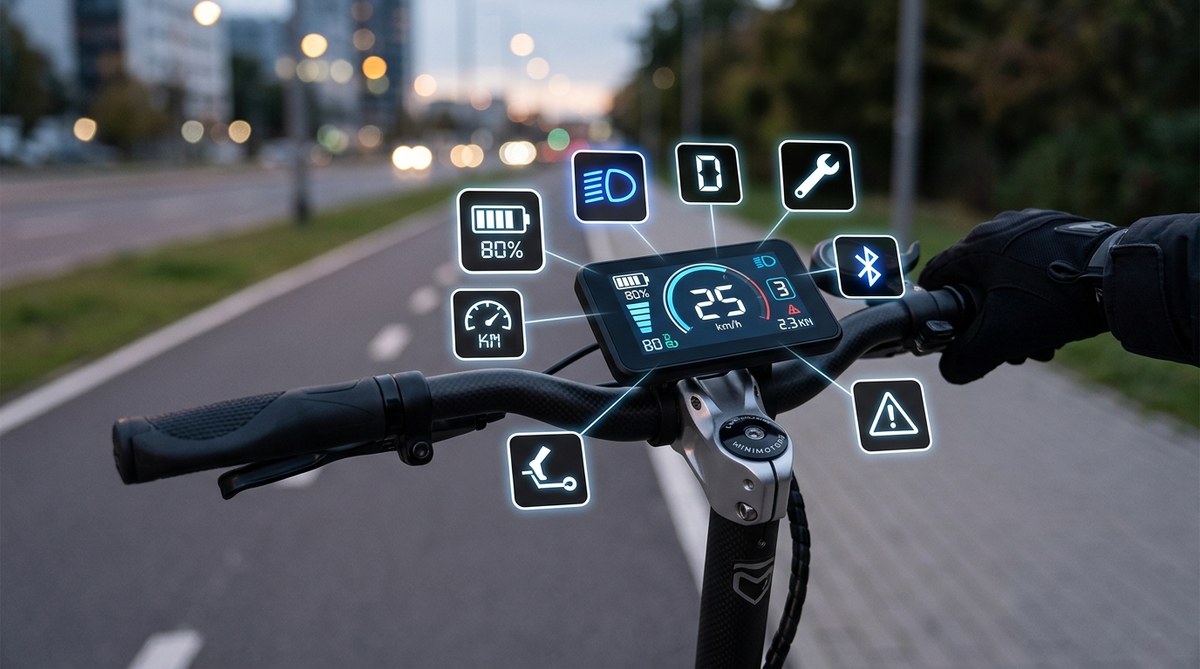
What Does Each Icon on Your E-Scooter Display Mean?
You just got your new e-scooter and you’re ready to ride. Then you glance at the display and see a bunch of symbols you don’t recognize. It’s okay. That little screen is packed with information, and once you know what each icon means, you’ll ride smarter and safer.
E-scooter display icons vary by brand, but most share common symbols for battery level, speed mode, headlight, cruise control, and error codes. Knowing these icons helps you avoid sudden breakdowns, ride more efficiently, and extend your scooter’s life. This guide walks through each icon, explains what it does, and gives you practical tips for responding to warnings. No more guessing what that flashing triangle means.
Battery Icon: The Fuel Gauge of Your Ride
The battery icon is the easiest to spot. It usually shows a rectangle with bars inside. The number of filled bars tells you the remaining charge. On some displays, you will also see a percentage number next to it. Many new riders miss one crucial detail: the battery icon can flash or change color when the charge gets low. If you see a red battery symbol or a blinking outline, you have less than 10% left. Find a charging station or head home.
A common mistake is trusting the battery icon during cold weather. In winter, the lithium cells in your battery lose some capacity temporarily, so the icon may show less charge than usual. Also, if you ride uphill for a while, the voltage drops and the icon might appear lower than the actual remaining power. Give the scooter a minute to rest on flat ground and check again.
Speed Display and Mode Indicator
Most e-scooters show your current speed in large numbers, usually in miles per hour (mph) or kilometers per hour (km/h) depending on your region. Next to or below the speed readout, you will often see a letter: L, M, H, or S. These letters stand for speed modes.
- L = Low or Eco mode. This limits your top speed to save battery.
- M = Medium or Standard mode. Good balance of speed and range.
- H = High or Sport mode. Full power for faster riding.
- S = Some scooters use S for Sport mode instead of H.
If your scooter has a push button to change modes, you can switch while moving. But be careful: hitting high mode on a steep hill can drain your battery fast. For daily commuting, medium mode is usually the sweet spot.
Headlight Symbol
A small icon that looks like a lamp or a beam of light. This indicates whether your headlight is on. Some scooters have an auto setting that turns the light on when the environment gets dark. Others require a manual press. Always check this icon before night rides. Riding without a headlight is dangerous in low light, and in many US cities it is illegal.
Note: some scooters have a separate daytime running light symbol, often a smaller dot or a DRL label. If you see that, your scooter has a visibility light that stays on always.
Cruise Control Icon
Cruise control is a handy feature for long, straight stretches. The icon is usually a small “CC” or a circle with a horizontal line through it. When cruise control is active, the scooter holds a steady speed without you holding the throttle. This saves thumb fatigue on your commute.
But here is the catch: cruise control disengages the moment you press the brake or twist the throttle too hard. If the icon stays on even after you stop, you may have accidentally engaged it while stationary. A simple tap of the brake turns it off.
Brake Warning and Regenerative Braking
You will often see a small brake pad icon or an exclamation mark inside a circle. This can mean two things:
- If the icon is solid and not flashing, your brake levers are engaged. This is normal when you are braking.
- If the icon flashes or stays on when you are not braking, you may have a brake sensor issue. Loose wiring or a misaligned brake lever can trigger this.
Some scooters also show a regenerative braking indicator, like a lightning bolt inside a circular arrow. This tells you the motor is acting as a generator to slow you down and recharge the battery. Seeing it flash while you decelerate is a good thing. If you see it constantly while coasting, your regenerative braking might be set too high, which can make the ride jerky.
Error Code and Warning Icons
The most ignored symbol is the error code. Usually shaped like a wrench, a gear with an exclamation point, or the letters “Err” followed by a number. Each number corresponds to a specific problem. For example:
| Code | Meaning | What to Do |
|---|---|---|
| 01 | Throttle malfunction | Check the throttle cable or contact support. |
| 02 | Brake sensor failure | Inspect brake lever wires. |
| 03 | Motor hall sensor error | May need a controller or motor replacement. |
| 04 | Overcurrent protection | Turn off, wait 30 seconds, restart. |
| 05 | Communication error | Reconnect the display cable. |
You will often see a red triangle with an exclamation mark as a general warning. That can mean low battery, overheating, or a system fault. Stop and check other icons to narrow it down.
Expert advice: Write down the error code numbers from your scooter’s manual and keep a screenshot on your phone. When you see an error on the road, you can diagnose the problem without having to ride home blind.
Overheating and Temperature Icons
Thermal management icons are common on performance e-scooters. You might see a thermometer symbol or a “T” with a number. If the temperature reads above 140 degrees Fahrenheit (60°C), the scooter will reduce power to protect the motor and battery. This usually happens after a long uphill climb or riding on a hot summer day.
If the overheating icon turns red, stop riding immediately. Let the scooter cool down for at least 20 minutes. Continuing to ride can permanently damage the battery cells.
Bluetooth and Smartphone Connectivity
A small Bluetooth icon (the B angular symbol) means your scooter is paired with a smartphone app. This allows you to change settings like speed limits, acceleration curves, and regenerative braking strength. Some scooters also show a phone icon when a call is incoming via the app.
If the Bluetooth icon keeps blinking and never stays solid, your connection is unstable. Move your phone closer to the display, or close other apps that use Bluetooth. A solid connection is needed for firmware updates, so keep an eye on this icon when you want to upgrade your scooter’s software.
How to Reset or Troubleshoot a Stuck Icon
Sometimes an icon stays lit even after you fix the problem. This can happen after a quick shutdown during a voltage spike. Here is a simple process to clear memory errors:
- Turn off the scooter using the power button.
- Disconnect the battery connector if you have access (only if you are comfortable doing so).
- Wait at least 10 seconds. Reconnect the battery.
- Turn the scooter back on. Most error icons should clear.
- If the icon returns within a minute, there is a real hardware issue.
- Contact the manufacturer or a local repair shop.
If you are unsure about your scooter’s battery health, read our guide on how long do e-scooter batteries actually last to understand when your battery might need replacement.
Turning Display Knowledge Into Confident Riding
You now know what each icon on your e-scooter display means. The next time you see a flashing symbol, you will not have to guess. You will know whether it is a low battery warning, a brake sensor issue, or simply that you left the headlight on. This knowledge helps you ride longer, safer, and with fewer surprises.
Take a few minutes to read your scooter’s manual and compare the icons to this guide. If you notice any symbol we did not cover, drop us a note through our contact page. We love hearing from riders who are getting the most out of their scooter. Now go enjoy your ride, with a full understanding of what that little screen is telling you.
